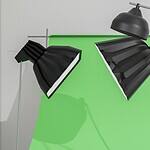
When you’re getting ready to shoot a jingle or any video content, booking a green screen studio rental in Cincinnati can be a smart move. But just walking into the studio with your gear isn’t enough to guarantee the results you want. A little prep and planning can make a big difference in how smooth the shoot goes and how clean your footage turns out.
Whether you’re creating a full video ad with voice, visuals, and a jingle, or just trying out some short clips for your brand, it helps to understand how a studio works. There are small decisions that add up fast, including things like the time of day, what you’re wearing, or how your sound is set. Let’s go over the parts that matter most so your next studio shoot doesn’t end in a scramble.
Pick the Right Time of Day and Season
Winter can be tricky for studio shoots. If you’re booking for January or February, you’ll want to think about what can affect the setting before you even step inside.
• Days are shorter, which means natural light fades quicker. Even if the studio has full lighting inside, changes in outside light can slip in and throw off the tone of the footage.
• Cloud cover and snow can dim or reflect light through windows, depending on the setup. If the space gets any outside light, your time of day matters more than you might think.
• Cincinnati roads during winter can slow you down too, whether from snow or extra traffic. Give yourself extra time to arrive, park, and get settled without rushing.
• When loading in gear or moving in and out of the studio, bring a coat you can shed fast. Most studios are warm once you’re inside, but waiting or setting up near the door can be a chilly surprise.
Being on time and thinking through your setup window will help you keep the calmer pace you need to focus once recording starts.
Prep for Lights Before You Start Rolling
Lighting is one of the biggest reasons green screen videos look great, or fall apart. The green background only works well when it’s lit evenly. One bad shadow or misplaced lamp can make parts of your subject disappear or glitch during the edit.
• The best lighting fills the space softly and evenly, without strong shadows behind your subject or around the edges of the frame.
• Make sure the green screen is flat and smooth, not wrinkled or uneven. Bad lighting and textured screens often cause messier results you’ll have to fix later.
• Be ready to move lights around. A single overhead light often isn’t enough, especially if you want a clean cut for someone moving on screen.
• Don’t rush this part. Even five minutes adjusting the lights before rolling can save you hours fixing video problems after the shoot.
We provide access to professional studio lighting and editing tools, so you can tailor your setup for crisp green screen shots. When in doubt, test with a short clip and look at it on a computer, not just through the camera screen.
Dress and Move the Right Way in Studio
What you wear and how you move can seem small, but they show up quickly on video. Your audience might not notice a color mismatch, but your editor definitely will.
• Stick to solid colors that aren’t green, and skip busy patterns. Anything shiny or reflective might bounce light in wild ways, especially under bright setups.
• Don’t forget about shoes. Loud shoes echo. Tall shoes cut across frame lines if you’re close to the edge of screen areas. Simple is better.
• If you’re walking, turning, or pointing during the shoot, your movements need to be slow and smooth. Jerky motion across a green screen is hard to track for background editing.
• Use tape to mark starting spots or key positions if you’re changing angles. It keeps everything consistent and makes editing easier if you need to retake scenes.
Making a short checklist of what you want to do on camera helps avoid awkward half-movements or sudden changes that don’t translate well in the final cut.
Double-Check Your Sound Plan
Sound often gets ignored until it’s a problem. But poor audio can drag down a shoot way faster than a lighting mistake. Start strong by testing it early.
• Bring headphones. Most studios don’t offer the same sound clarity your home speakers might. You’ll hear hums and random noise much better with a headset on.
• Use indoor mics that fit how loud or quiet your speaker is. A voice meant to carry over radio might sound too harsh on a lapel mic without adjustment.
• If you’re playing a backing track for a jingle, make sure the audio device is easy to control inside the room. Don’t rely on WiFi or stream-only files if they might lag.
• Record a short test. Walk around with the mic on. Say your script out loud before filming. You’ll find problems now rather than during playback.
With years of radio and jingle production under our belt, we understand how to capture crisp, clear audio in a studio setting. Sound problems are hard to fix and often ruin the best takes. Giving it just a little more time upfront makes the whole shoot feel more relaxed.
Ask for Help Before You Run Out of Time
No one wants to waste time during a rental. But plenty of people get stuck trying to figure things out alone, even when help is nearby.
• If the studio offers a quick rundown or a chance to ask questions, take it. Even experienced video folks miss small things when using a setup for the first time.
• Have a plan written down. Don’t rely on memory. Include camera angles, timing notes, and who says or does what. It keeps things moving and shows you where help is needed.
• Ask someone to run the camera or watch the timing if you’re trying to appear on screen. It’s hard to do both and keep things looking right.
• Pay attention to time cues, especially if your rental has a hard stop. Even simple feedback from another person can help you reset faster between takes.
Working with others, even for five to ten minutes, can save you from rescheduling scenes or dealing with bad footage after the day is done.
Better Studio Time Means Better Results
If you’re using a green screen studio rental in Cincinnati, small steps make a big difference. Planning your shoot around winter’s shorter daylight, adjusting your lighting, wearing the right clothes, testing your sound, and getting a little help when you need it are all things that lead to a smoother day in the studio.
Most of what goes wrong in a shoot isn’t about equipment, it’s the little setup choices before the camera rolls. When you walk in with a good layout, a sound check plan, and someone who can help you catch small mistakes, your shoot feels more focused from the first take to the final cut. With the weather outside colder and the sun down early, a few smart calls up front keep your creative energy on track.
When your next project calls for more than just a camera and a green wall, we’re here to help you plan every detail. From timing your session to perfecting the lighting and making sure your audio is crisp, a steady setup makes sure your video starts strong. Our space is designed for creative work like jingles, voiceovers, and more, so your time is productive and focused. For a smooth, clean setup with a green screen studio rental in Cincinnati, contact Killerspots at 513-270-2500 and let’s get your session on the books.